

PRODUCT UPDATE
AVRO Mobile 3.5
Smarter photos with AI, custom labels, and more
Thursday, September 10, 2026

What's New in 3.5?
AVRO Mobile 3.5 adds three new capabilities in addition to overall performance improvements:

AI-assisted, in-app photo upload and approval, powered by RemotePhoto by CloudCard.
Custom OneCard ID labels. Tag and group users the way your school or organization already organizes people.
Additional barcode format support. More scanners and readers can read your OneCard ID without new hardware.
All three features are available to every AVRO Mobile customer starting Monday, September 14, 2026, on Apple App Store and Google Play. Nothing turns on automatically; your users won't see any change until you contact us to enable a feature. Photo upload and AI approval also requires a RemotePhoto by CloudCard subscription.
Get in touch to see it in action and find out how much time it can save your team, your OneCard users will love it!
In-App AI-Powered Photo Upload & Approval
We've partnered with RemotePhoto by CloudCard to deliver the most secure and intuitive self-serve in-app photo upload and approval experience for OneCard users. Everything is done right from inside of AVRO Mobile!*
How it works at a glance:
- Users submit their own ID photo from their phone. No photo station needed.
- AI corrects rotation, crops, and removes the background on submission.
- Non-compliant photos are declined automatically, with an instant, specific reason. The user fixes it and resubmits. Staff never see the bad photo.
- Compliant photos route to a pending queue for manual approval, or auto-approve, your choice.
- Approved photos deliver into the OneCard system on a schedule you set.
- IDs can be pre-printed before day one.
- Includes a dashboard: who's submitted, who hasn't, approved vs. pending, and automated reminder emails.
Why your team will absolutely love it:
- Frees up staff time spent on photo intake and correction, redeployed to higher-value work during busy onboarding periods.
- IDs ready before day one instead of everyone waiting in line for a photo.
- Bad photos get caught and fixed by the user, not printed onto a card.
- Same value for a campus or a corporate office: any org that photographs people in person to make an ID.
*This feature requires a RemotePhoto by CloudCard subscription. New to RemotePhoto and photo automation? Get in touch today and we'll show you how it works!

Custom OneCard ID Labels
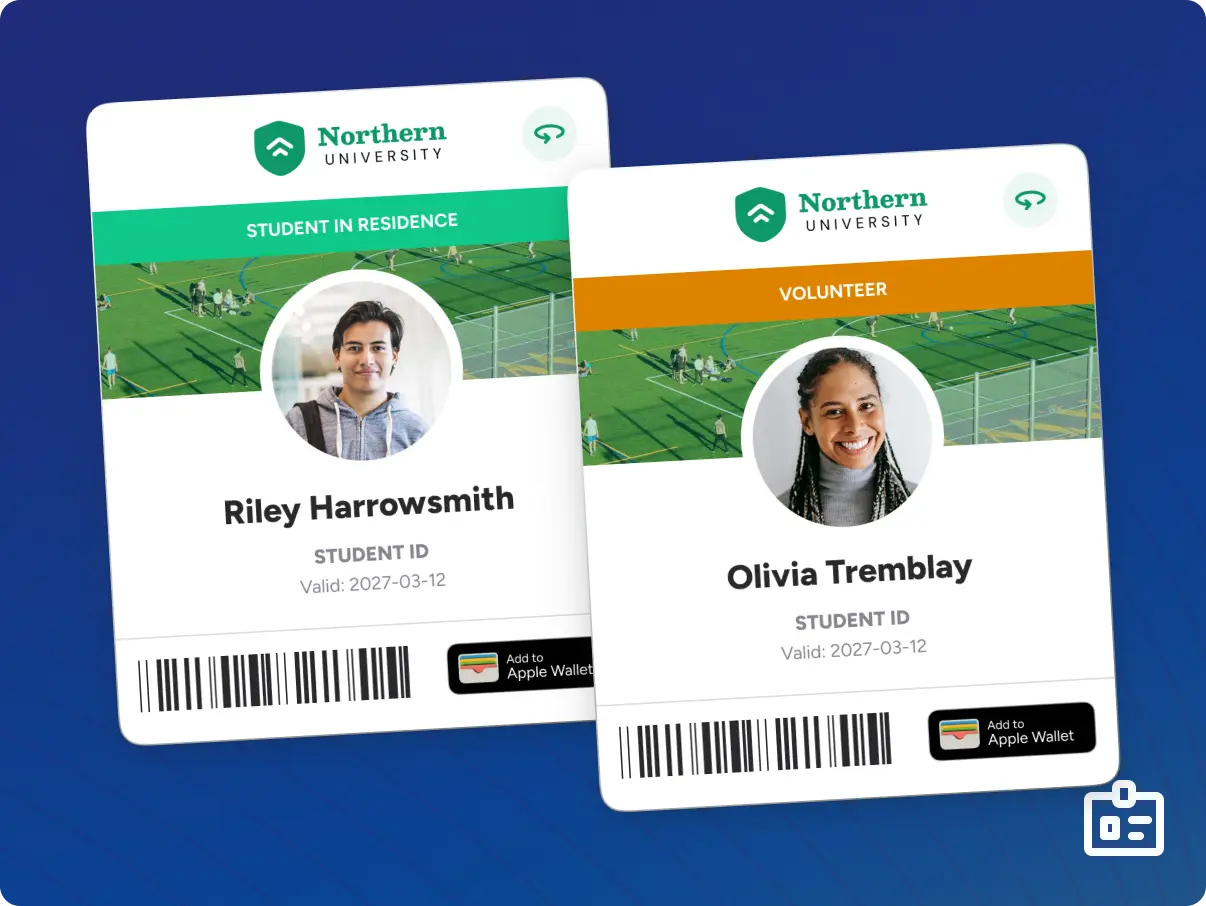
Organizations can now display their own coloured, labeled tags that show on a user's OneCard ID in the app. Labels are fully custom. You decide the text, the colour, and who gets which one*.
Examples of custom labels:
- Residence life: Residence vs. Non-Residence, by building or meal plan.
- Higher ed: Student, Staff, Faculty, Resident Advisor, Volunteer, Alumni, Guest.
- Corporate: Employee, Visitor, Contractor, Executive, Board Member, Temporary Staff, Security Clearance Level.
- Events: VIP, Staff-on-Duty, Volunteer
Why our customers are excited about this feature:
- Instant, at-a-glance ID for front-line staff and security, no system lookup needed.
- One feature, unlimited configurations. Serves a university and a corporate office differently.
*Creation of label types and assignment of user groups may require special integration depending on your organizational set up with AVRO and AVRO Mobile. Please get in touch today to discuss this new feature.
Additional Barcode Format Support
The OneCard ID now supports additional barcode formats, alongside what it already supports today.
Where this matters:
- Wider range of card readers and scanners can read the OneCard ID out of the box.
- May close compatibility gaps without buying new hardware.
- Useful when bringing new scanners online or standardizing across sites with mixed reader fleets.

Frequently Asked Questions
- Will this disrupt anything on launch day? No. All three features require ITC to enable them at your request. Until then, your experience is identical to today's.The OneCard ID now supports additional barcode formats, alongside what it already supports today.
- Does this cost extra? Custom OneCard ID labels and barcode support are included with enablement. RemotePhoto requires its own integration; your Account Manager can walk through what's involved if you don't already have one.
- Is this for schools only? No. AVRO Mobile serves higher ed, corporate, and other organizational customers. All three features apply regardless of setting.
Getting Started With AVRO Mobile 3.5
Interested in any of the above? Contact your ITC Account Manager and we'll help scope and enable the right features for your organization. Onward!